Start Marketing Your Brand on Pinterest: How to Set Up and Optimize Your Pinterest Business Account
Despite its 500 million+ active users, Pinterest often gets overlooked as a serious marketing platform. Sure, plenty of business owners scroll through it daily for inspiration and ideas, but rarely tap into its full potential.
Here’s the thing: Pinterest isn’t just for saving recipes or your wedding inspo—it’s not even a social media app!
Pinterest is a visual search engine, similar to Google, where users actively search for products and ideas, ready to take action. In fact, 85% of weekly users have made a purchase directly from a Pin!
Unlike classic social media posts that expire faster than your morning coffee, Pinterest gives your content months—or even years—of visibility. Your Pins can even show up in Google search results, extending your reach even further. Throw in Pinterest’s built-in shopping tools, and boom—you’ve got yourself a 24/7 virtual storefront.
And the best part? You don’t have to spend hours engaging excessively or churning out endless videos. Pinterest does all the heavy lifting for you! So, if you’re tired of battling algorithms and chasing trends, Pinterest could be the perfect platform for you!
Ready to get started? Here’s a step-by-step guide to setting up and optimizing your Pinterest business account:
1. Create a Business Account
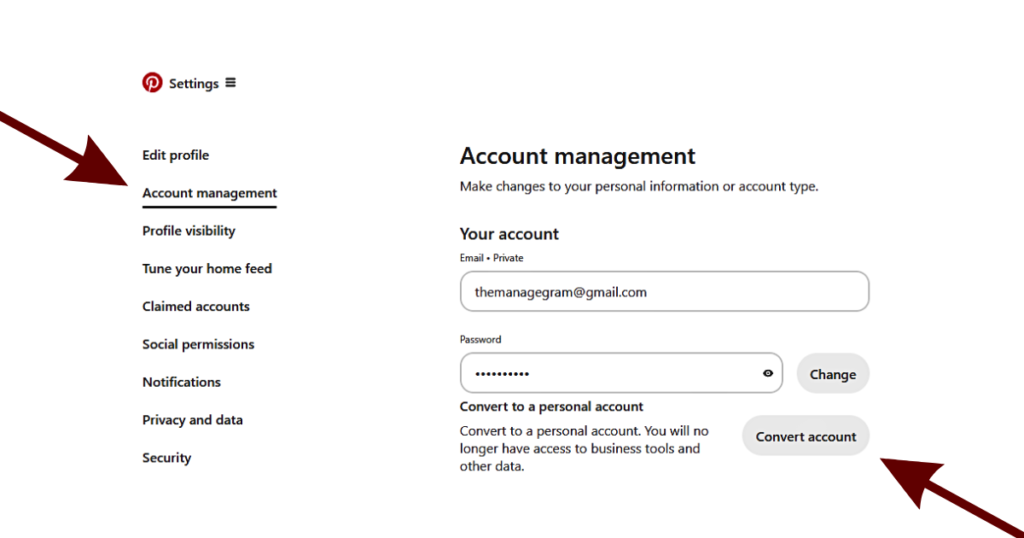
Just like on other platforms, having a business account on Pinterest unlocks perks like analytics, ad tools, and performance insights. If you already have a personal account, no worries—you can easily switch it to a business account without losing any existing content.
How to switch:
Go to Edit Profile → Account Management → Convert Account.
2. Set Up Your Profile
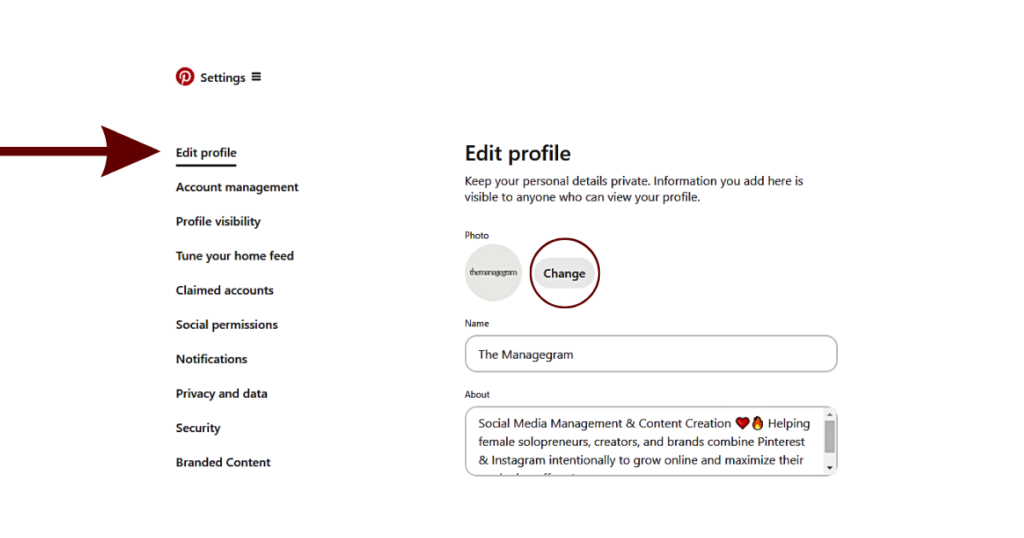
First impressions matter, and your profile is the face of your brand on Pinterest. A polished, optimized profile helps you show up in searches and connect with your ideal audience.
- Use an on-brand profile picture and cover photo.
- Write a keyword-rich description explaining what you do and who you serve.
Profile picture size: 165 x 165 px
Cover photo size: 800 x 450 px
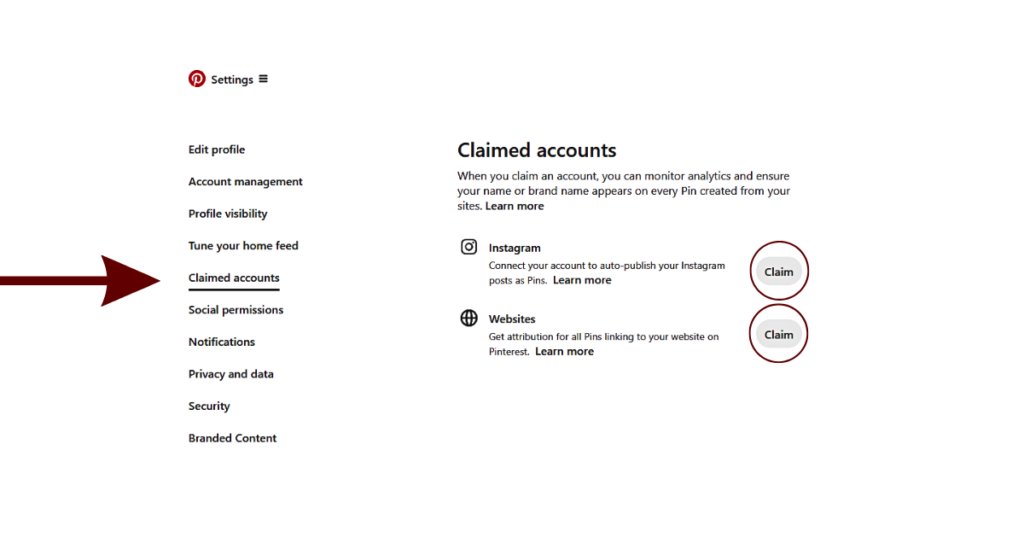
3. Claim Your Website and Instagram Account
Claiming your website and Instagram account boosts your credibility on Pinterest. You’ll get access to deeper analytics, credit for Pins created from your content, and more traffic to your website and Instagram account, maximizing your overall marketing efforts.
But don’t let Pinterest auto-post your Instagram content! Instagram posts aren’t optimized for Pinterest. Instead, take the time to repurpose them for the platform to make them for better results.
4. Do SEO Research
Since Pinterest is a search engine, SEO (search engine optimization) isn’t optional—it’s essential! Meaning, keywords are your golden ticket to getting discovered.
How to Optimize for SEO:
- Create a keyword bank for quick reference, making it easier to repurpose descriptions, instead of starting from scratch every time.
- Use straightforward, descriptive language to integrate keyword phrases—avoid keyword stuffing, as it can lead to account suspension.
How to Find Keywords for Pinterest:
- AI Tools: Use AI to generate keyword ideas based on your niche and target audience.
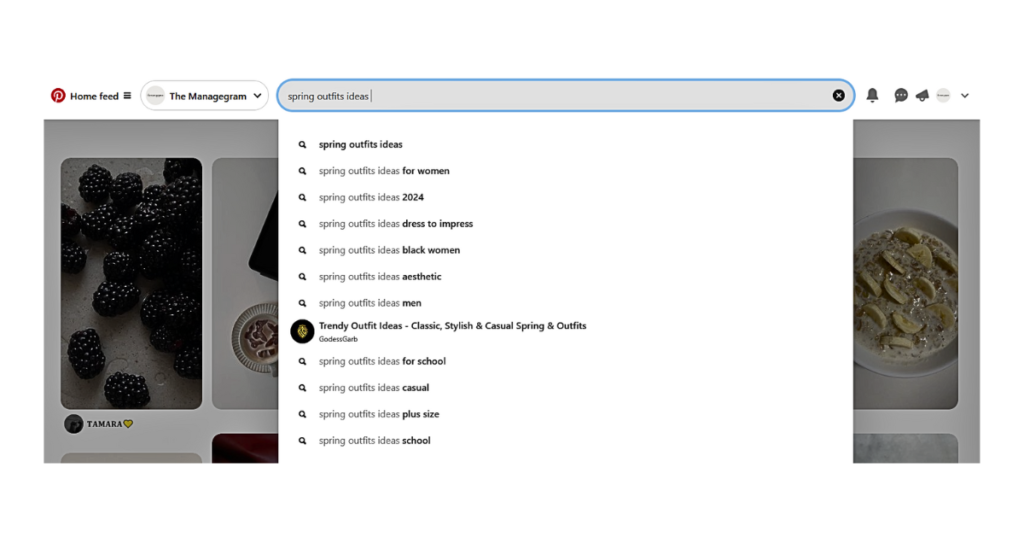
- Pinterest Search Bar: Type your main keyword directly into Pinterest’s search bar to see related phrases users are actively searching for.
- Pinterest Trends: Check for upcoming trends and leverage those terms to give your content extra visibility.
5. Set Up & Optimize Your Pinterest Boards
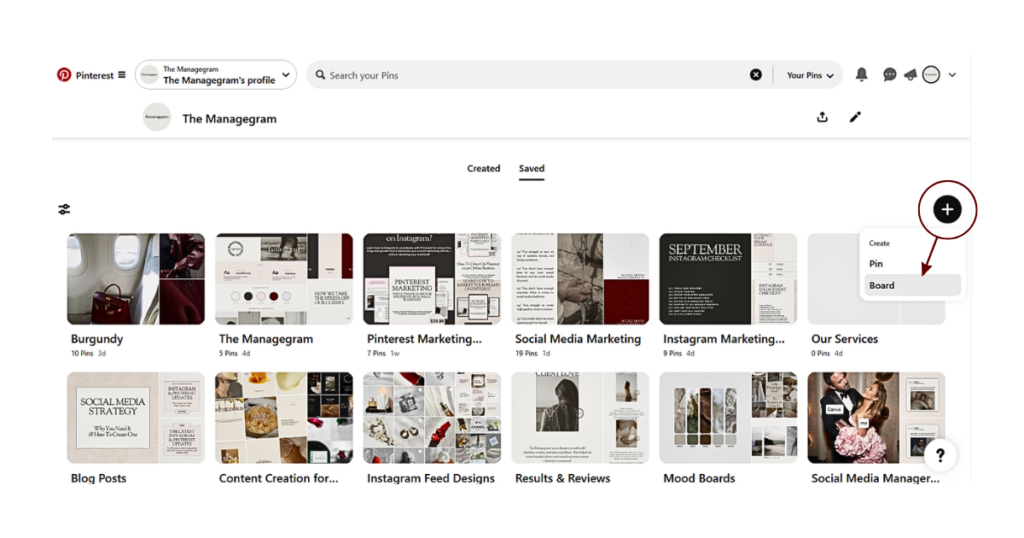
Think of Pinterest boards as digital folders that help you organize your content by topic, making it easy for visitors to explore your content and find what they’re looking for. Having a well-organized profile not only looks professional, but also helps your audience connect with your brand instantly. Here’s how to make your boards work for you:
Create Relevant Boards
Set up boards that align with your niche, products, or services. For example, if you’re a wedding planner, create boards like “Wedding Color Palettes”, “Wedding Venue Ideas”, or “Bridal Accessories”. Each board should have a clear focus and be highly relevant to your target audience.
Optimize Your Boards Using SEO
Make your boards searchable by giving them keyword-rich names and descriptions. For example, instead of a vague title like “Inspiration”, use “Modern Home Decor Ideas” or “Healthy Meal Prep Recipes”.
- Board Names: Keep them short but descriptive.
- Descriptions: Include relevant keyword phrases naturally to help Pinterest and your audience understand your board’s topic.
Make Your Boards Accessible
Keep your profile visitor-friendly by putting your most important boards front and center. Whether it’s a seasonal collection, a top-selling product category, or something trending, make sure it’s easy to spot. Add board covers for a cohesive, professional look.
Leverage Different Types of Boards
- Group Boards: Collaborative boards allow you to partner with other accounts whose content complements yours, helping increase your board’s reach and visibility.
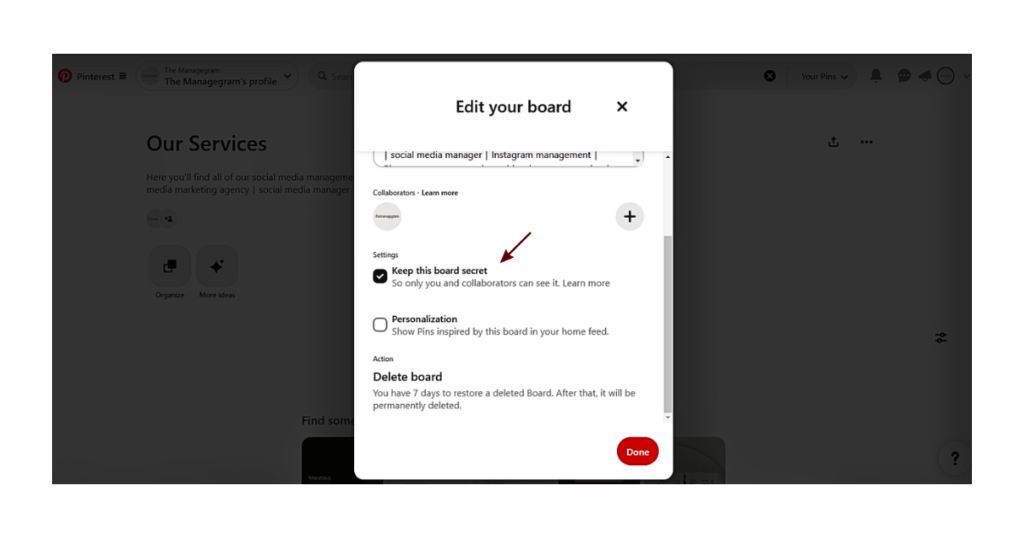
- Private Boards: Secret boards let you gather inspiration and ideas without cluttering your public profile, confusing your audience and Pinterest’s algorithm.
6. Create High-Quality Pins
Pinterest thrives on visually stunning content, so creating Pins that stand out is non-negotiable. But first, you need to understand the different types of Pins that you can use:
Types of Pins
- Image Pins: Image Pins feature a single image. You can upload your own or save an image directly from the web (which will link back to the original creator’s website). Business accounts can even promote Image Pins as ads.
- Video Pins: These autoplay on feeds and can include text overlays, music, and stickers to make them interactive.
- Rich Pins: Automatically pull details from your website to your Pin. Options include:
- Recipe Pins: Include ingredients, serving sizes, cook time, and even ratings.
- Article Pins: Showcase titles, authors, and descriptions from blog posts.
- Product Pins: Show live product info like price, availability, and purchase links.
- Product Pins: Specifically designed for shopping, these direct users to a retailer’s website. You can create them by adding your product catalog to Pinterest or using product-rich Pins.
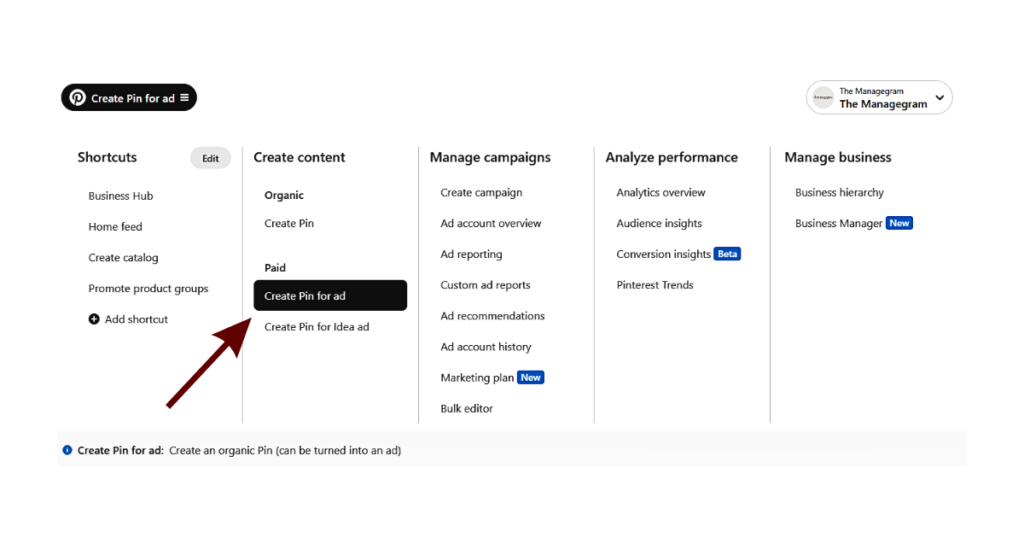
What Makes a Pin Perform Well?
Whether you’re creating an Image Pin or a Rich Pin, quality matters. Here’s what every Pin needs to succeed:
- A high-quality, scroll-stopping image.
- An SEO-optimized title and description up to 800 characters .
- Alt text to boost discoverability and accessibility.
- A fresh, clickable link like a blog post, product page, or Instagram post.
- A clear call-to-action (CTA) inviting users to click through.
Finally, don’t stress about creating all your Pins from scratch. Repinning high-value content from others can add variety and keep your profile active.
7. Schedule Your Pins
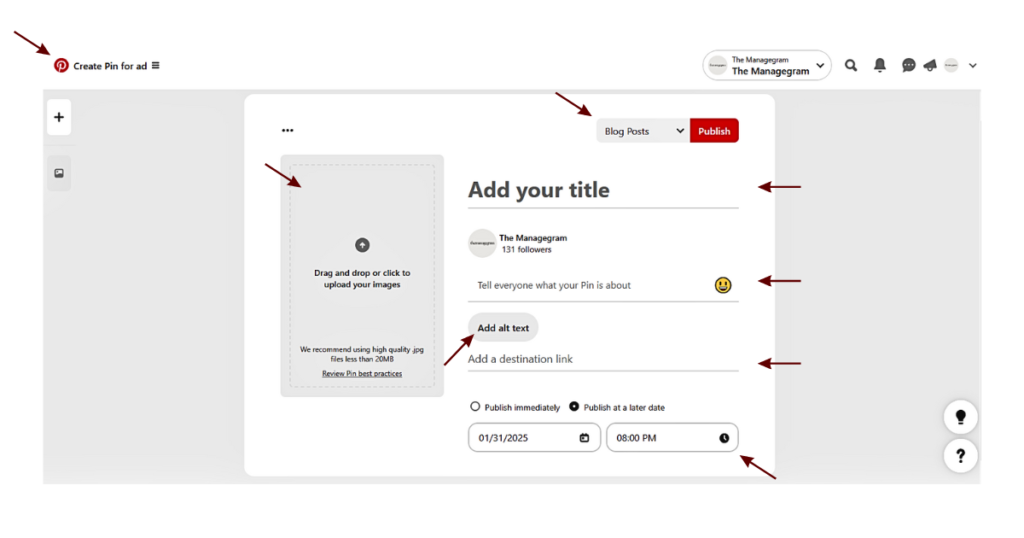
Scheduling Pins is a game-changer for staying consistent without spending all day on Pinterest. Here’s how to schedule your Pins:
Steps for Scheduling a Pin:
- Choose a Board: Pick the board that aligns best with your Pin’s topic.
- Give it a Strong Title: Use relevant keywords.
- Write an Optimized Description: Naturally include relevant keywords to boost visibility.
- Add Alt Text: This helps both visually impaired people and Pinterest’s algorithm understand your Pin better.
- Use Fresh Links: Don’t reuse the same link for everything! Instead, direct users to specific pages of your website, blog, or product listings for better results.
- Pick a Date: You can schedule Pins up to 30 days in advance. Evenings (8–9 PM) tend to perform best.
By following these steps, you can keep your content flowing consistently and effortlessly reach your audience when they’re most active.
8. Track Your Performance
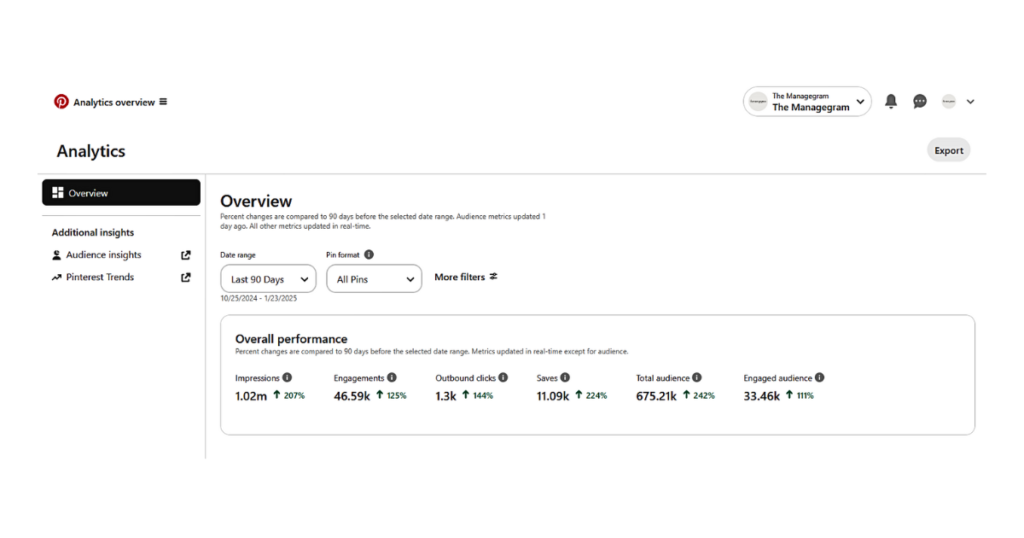
Pinterest analytics are your best friend when it comes to improving your strategy and understanding what works. By reviewing them regularly, you can identify trends, spot your best-performing Pins, and adjust your strategy to create more of what your audience loves.
But first, you should understand exactly what Pinterest’s key metrics even mean:
- Impressions: The total number of times your Pins appear on someone’s screen. A great indicator of how well your SEO is working.
- Monthly Views: The total number of times your Pins were viewed in a month. While this number is nice to see, it’s not the most reliable measure of success.
- Engagements: The total number of interactions your Pins receive, like clicks and saves. This is a better reflection of how your content resonates with your audience.
- Total Audience: The unique number of users who’ve seen or interacted with your Pins.
- Engaged Audience: The unique users who actively interact with your content. Tracking this helps you understand who’s genuinely interested.
- Saves: How many times people have saved your Pins to their own boards. Saves extend your reach by sharing your content with a wider audience.
- Outbound Clicks: The number of times users click on links in your Pins, driving traffic to your website, blog, or store. This is the ultimate goal for many businesses on Pinterest!
That’s All There Is To It!
No that your Pinterest profile is all set up and optimized, you can attract new audiences, showcase your expertise, and turn casual browsers into customers. Happy pinning!
Ready to take your Pinterest game to the next level? Check out our Pinterest Marketing Guide! A 50-page e-book packed with tips on marketing your business on Pinterest and integrating it seamlessly with Instagram to maximize your online efforts without doubling your workload.
If you’re looking for hands-on support, we also offer various Pinterest services. Fill out the inquiry form on our website, and let’s grow your business together!